What's new · J5 Code 0.0.52
Your agents can work across machines, and need you less.
Links between your machines, a Windows app in beta, Crews and personas that need you less, and everything J5 Code takes in from T3 Code 0.1.3 to 0.1.7.
Your agents can work across machines
Link two J5 servers once. Agents on each can message agents on the other, hand them tasks and use its tools, at the access you choose.
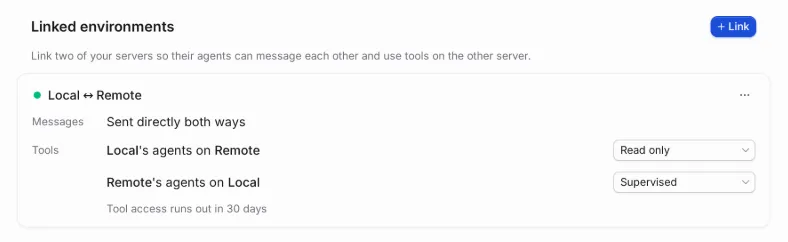
One link sets it up
Link two servers from Settings → Environments → Linked environments, right after you add a server, or by approving an agent's request to link. J5 finds the address each server reaches the other at, and you can enter another.
A level for each direction
Each direction has its own Tools level, from Off, which leaves messages only, to Full access. Tools last 30 days, and you can renew them.
Through a firewall
A laptop nothing can reach can still be linked. It collects its own messages, and while it runs, the other server's agents can use tools on it.
Agents know when a machine is away
A call to a linked machine that isn't answering fails with a reason that says so.
Remove means remove
Removing a link ends its messages and its tools access.
J5 Code on Windows, in beta
Windows x64 now gets every release: the desktop app and the j5 server.
The desktop app
Download the installer from the download page. It isn't code-signed yet, so Windows warns before it runs it.
The server
Install it from PowerShell with the command on the download page, then run j5. Windows has no background service, so the server runs while j5 does.
Crews
A Crew does more on its own and brings you only what needs you.
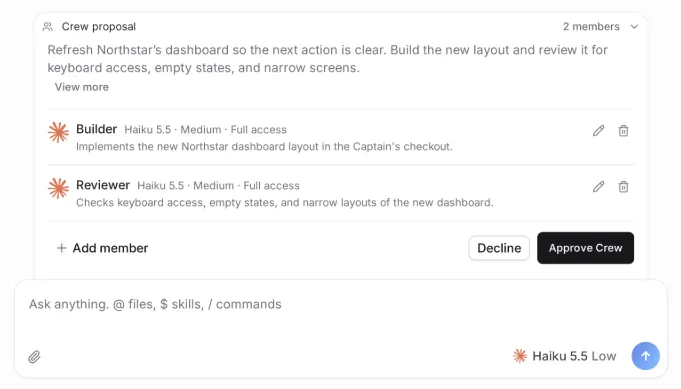
A quieter Captain
A Captain's chat shows only what needs you.
Proposals in the composer
Review, edit and approve a Crew's roster above the Captain's composer.
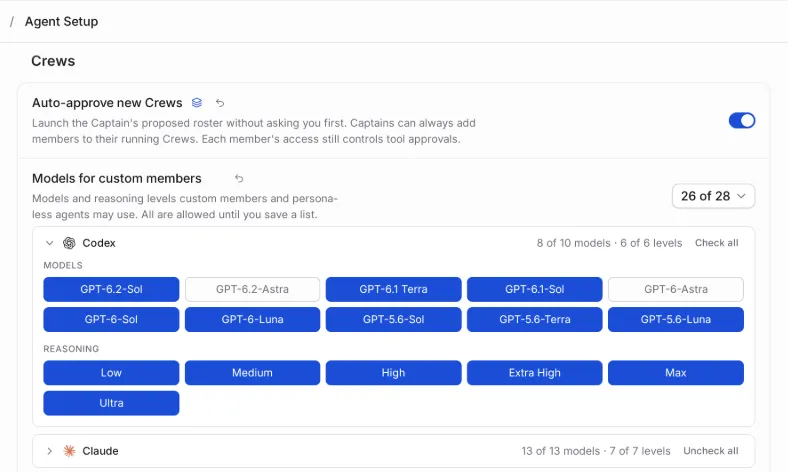
Start on their own
Turn on Auto-approve new Crews in Settings → Agent Setup → Crews, for every project or just one, and choose the models and reasoning levels custom members may use.
Members start with work
A member starts on its first assignment, not before.
Replace a seat
A Captain can move a seat to another model. The new member takes over its unfinished playbook steps.
One question, two places
A decision only you can make appears in your Inbox and above the Captain's composer. Answer it in either.
Tidy archives
Archiving a Crew removes its clean, merged worktrees, squash-merged ones included. One Inbox item asks about the rest.
Lineage
A thread's details show the Peer Agents and Crews it started.
Personas
Personas stay what you made them, even when an agent is the one picking.
Who picked sets the limits
A persona you start runs as saved. One an agent picks never gets more access than that agent has, and runs only on models you've allowed.
Allow this once
A persona an agent can't start says why and asks you in the Inbox. When one limit stood in the way, such as a model you haven't allowed, an Owner can allow it once. The next launch meets the usual limits again.
Agents draft, you save
Ask an agent to change a persona. It drafts the change, and an Owner saves it from the ask with Save persona.
An ordered model list
A persona tries its models in order and skips a provider account that has reported running out of quota.
Three access levels
Read-only, workspace write or full access.
Independent reviewers
Mark a persona as an independent reviewer, and it prefers a model that didn't write the work it reviews.
Switch a worker's model
Move a worker to another model from the composer, for example when its provider hits a usage limit.
Inbox and people
Answer more completely, and share more easily.
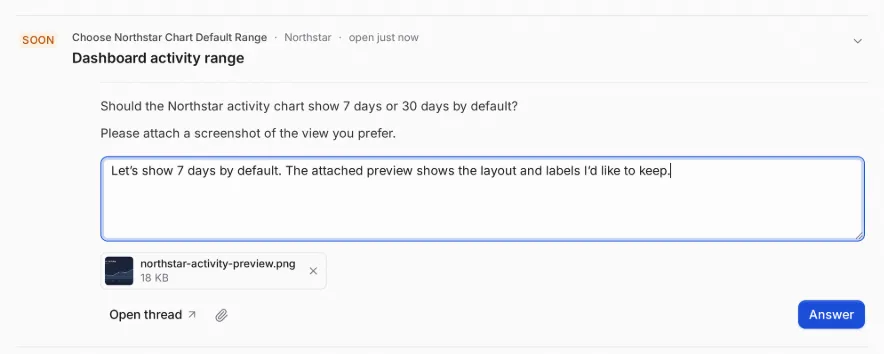
Answer with a file
Attach screenshots and files to an Inbox answer.
Several asks at once
An agent can ask you several things at once, each as its own item.
Settled is settled
Settle a question in the agent's own thread, and the agent is told to take it off your Inbox.
Links that open
Web and artifact links in Inbox messages open, and a reply you haven't sent survives leaving the page.
People
Search Settings → People, and widen someone's access from their row. People a thread is shared with can search its messages.
Updates, agent tools and fixes
Smaller changes across J5 Code.
One switch for every machine
In the desktop app, Settings → About → Update track moves the app and the connected machines it can update to Stable or Nightly.
Safer updates
An update or track switch started from the app first checks that the new build can read the server's database.
For your agents
J5's tools return thread links, and j5 thread drives threads from a terminal again. t3_thread_interrupt with stop: true replaces j5_stop_agent.
Fixes
A Claude reply no longer folds away when another agent's message arrives. A question shows once in the Inbox after a restart. The project filter stays put. Notification sounds have a volume slider.
From T3 Code 0.1.3 to 0.1.7
J5 Code is built on T3 Code, and this release brings in its work from 0.1.3 to 0.1.7. The highlights:
A new design
A true black dark mode, dimmer read threads and simpler composer controls. Settings and Usage open over the thread you're in.
Side chats
Start a message with /side to ask about a thread while it keeps working. Bring the answer back when you want it.
Search inside messages
Cmd+K finds text inside messages, not just thread titles.
Local commits in the Diff pane
Review the commits you haven't pushed yet in the Diff pane.
Approvals don't block the composer
Sending a message while an agent waits for approval declines the request and steers your message in.
Compact idle Claude threads
Choose when an idle Claude thread over 200,000 tokens is compacted, under Settings → Providers → Advanced.
…and many smaller fixes. See T3 Code's release notes →